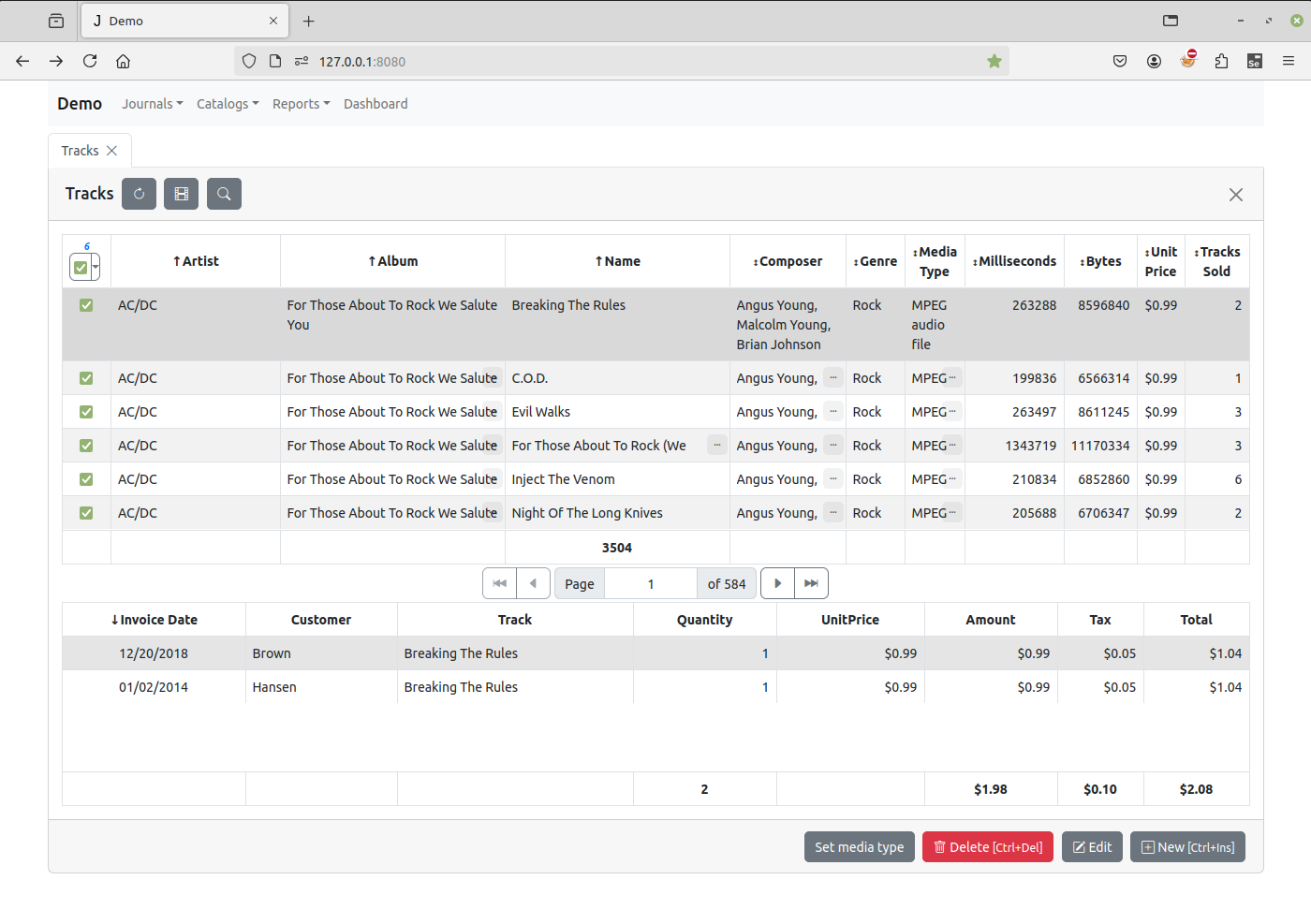
如何关联两个数据表
以下步骤适用于 Jam.py V5 版本,适用于两个数据库表未在构建器中通过 主/从关系(Master/Detail) 直接关联的场景。 (参见 教程 第三部分:明细表 )
在 Jam.py V7 版本中,演示应用程序的 曲目(Tracks) 数据表已与 发票(invoice) 明细表直接关联,因此无需执行以下步骤。
若数据表未在构建器中直接关联,在 Jam.py V7 中仍可使用以下步骤。
我们将以演示应用中的 曲目(Tracks) 和 发票(invoice) 实体项为例,说明如何关联两个实体项。我们会将 曲目(Tracks) 表中的记录,与 发票(invoice) 表中对应的已售出曲目列表关联( 销售(invoice) 表存储了所有已售出的曲目)。
在任务的客户端模块中声明的 on_view_form_created 事件处理程序内定义 view_form 的默认行为。
我们将在曲目的客户端模块的 on_view_form_created 事件处理程序里修改其默认行为:
function on_view_form_created(item) {
  item.table_options.height -= 200;
  item.invoice_table = task.invoice_table.copy();
  item.invoice_table.paginate = false;
  item.invoice_table.create_table(item.view_form.find('.view-detail'), {
      height: 200,
      summary_fields: ['date', 'total'],
  });
}
然后,我们将显示曲目数据的表格的高度减少 200 像素。
item.table_options.height -= 200;
使用 copy 方法创建 invoice_table 的一个副本, 再将副本的 paginate 属性设置为 false, 并调用副本的 create_table 方法来创建一个表格,用来显示已售出的曲目。
item.invoice_table = task.invoice_table.copy();
item.invoice_table.paginate = false;
item.invoice_table.create_table(item.view_form.find('.view-detail'), {
    height: 200,
    summary_fields: ['date', 'total'],
});
我们为表格设置了 200 像素的高度,并定义了汇总的字段。
如果我们不定义下面的 on_after_scroll 事件处理程序,这个表将总是空的:
function on_after_scroll(item) {
    if (item.view_form.length) {
      if (item.rec_count) {
          item.invoice_table.set_where({track: item.id.value});
          item.invoice_table.set_order_by(['-invoice_date']);
          item.invoice_table.open(true);
      }
      else {
          item.invoice_table.close();
      }
    }
}
只要当前记录发生更改,就会触发 on_after_scroll 事件。 所以当曲目数据改变时,我们调用 open 方法,预先设置过滤器和排序依据:
item.invoice_table.set_where({track: item.id.value});
item.invoice_table.set_order_by(['-invoice_date']);
item.invoice_table.open(true);
此方法向服务器发送请求,服务器生成 sql 查询,执行该查询并返回一个数据集, 该数据集包含按 invoice_date 字段降序排列的此曲目的已售出记录。
如果曲目数据集是空的,将通过调用 close 方法来清除已发票的数据集。
由于 Jam.py 中的控件都是数据感知型的,已售曲目数据集的每一次变更, 都会自动显示在我们在 on_view_form_created 事件处理程序中创建的表格中。
现在,每当曲目记录发生变化时,应用程序都会向服务器发送请求以刷新已售曲目列表。 这种方式效率不高,有时还会导致延迟。为了解决这个问题,我们使用 JavaScript 的 setTimeout 函数:
var scroll_timeout;

function on_after_scroll(item) {
    if (!item.lookup_field && item.view_form.length) {
        clearTimeout(scroll_timeout);
        scroll_timeout = setTimeout(
            function() {
                if (item.rec_count) {
                    item.invoice_table.set_where({track: item.id.value});
                    item.invoice_table.set_order_by(['-invoice_date']);
                    item.invoice_table.open(true);
                }
                else {
                    item.invoice_table.close();
                }
            },
            100
        );
    }
}
该函数保证了数据的更新频率不会一次超过 100 毫秒。
由于 invoice_table 是一个 明细表,它包含 invoice 字段,该字段存储了与当前记录相关的发票引用,因此我们可以向用户展示包含当前已售曲目记录的发票。 为此,我们在调用 create_table 方法时, 传入一个函数,当用户双击表格中的记录时会执行该函数:
item.invoice_table.create_table(item.view_form.find('.view-detail'), {
    height: 200,
    summary_fields: ['date', 'total'],
    on_dblclick: function() {
        show_invoice(item.invoice_table);
    }
});
传入的函数的定义如下:
function show_invoice(invoice_table) {
    var invoices = task.invoices.copy();
    invoices.set_where({id: invoice_table.invoice.value});
    invoices.open(function(i) {
        i.edit_options.modeless = false;
        i.can_modify = false;
        i.invoice_table.on_after_open = function(t) {
            t.locate('id', invoice_table.id.value);
        };
        i.edit_record();
    });
}
在这个函数里,我们创建了 发票台账(invoices journal) 的一个副本,并查找指定 id 的发票。当执行 open 方法时,我们将通过调用它的 edit_record 方法来显示发票内容。但是,在调用前,我们对其属性进行设置,这样它将以模态形式显示,而且用户也不能对其修改。
此外,我们还会动态地为获取到的发票的 invoice_table 明细分配 on_after_open 事件处理程序。在该事件处理程序中,我们通过调用 locate 方法,在已售曲目记录中定位到当前记录。
最后,我们还会检查 曲目(tracks) 的 lookup_field 属性。当该属性为 true 时,表示该项是为选择查找字段的值而创建的(即用户点击查找字段输入框右侧按钮时创建)。我们会确保当用户为查找字段选择值时,不显示已售曲目的记录。
此外,我们添加了一个提醒,告知用户可以到发票。
最终, on_view_form_created 的代码如下所示:
function on_view_form_created(item) {
    if (!item.lookup_field) {
        item.table_options.height -= 200;
        item.invoice_table = task.invoice_table.copy();
        item.invoice_table.paginate = false;
        item.invoice_table.create_table(item.view_form.find('.view-detail'), {
            height: 200,
            summary_fields: ['date', 'total'],
            on_dblclick: function() {
                show_invoice(item.invoice_table);
            }
        });
        item.alert('Double-click the record in the bottom table ' +
          'to see the invoice in which the track was sold.');
    }
}

var scroll_timeout;

function on_after_scroll(item) {
    if (!item.lookup_field && item.view_form.length) {
        clearTimeout(scroll_timeout);
        scroll_timeout = setTimeout(
            function() {
                if (item.rec_count) {
                    item.invoice_table.set_where({track: item.id.value});
                    item.invoice_table.set_order_by(['-invoice_date']);
                    item.invoice_table.open(true);
                }
                else {
                    item.invoice_table.close();
                }
            },
            100
        );
    }
}

function show_invoice(invoice_table) {
    var invoices = task.invoices.copy();
    invoices.set_where({id: invoice_table.invoice.value});
    invoices.open(function(i) {
        i.edit_options.modeless = false;
        i.can_modify = false;
        i.invoice_table.on_after_open = function(t) {
            t.locate('id', invoice_table.id.value);
        };
        i.edit_record();
    });
}