message
- message(mess, options)
使用范围: client
编程语言: javascript
父类: AbstractItem
描述说明
使用 message 方法创建一个模态窗体表单。
用 mess 参数指定显示在表单中的文本或 html 内容
options 参数是一个对象,它有以下属性:
title - 表单的标题
width - 表单的宽度,默认值为 400px
height - 表单的高度
margin - 使用此属性来定义表单主体的外边距
text_center - 如果为 true,表单主体中的文本元素将居中显示,默认为 false 。
buttons - 一个定义了将在表单底部创建的按钮的对象,对象的键是按钮名称,值是按钮被点击时将执行的函数。
button_min_width - 按钮的宽度的最小值,默认值为 100px 。
center_buttons - 如果为 true,按钮将居中显示,默认为 false 。
close_button - 如果为 true, 应用程序将在表单窗体的右上角创建一个关闭按钮,默认为 true 。
close_on_escape - 如果为 true,当用户按下 Escape 按键时,会关闭表单窗体,默认为 true 。
print - 如果为 true,应用程序将在表单窗体的右上角创建一个打印按钮,以便打印表单的主体内容,默认为 false 。
该方法返回表单的一个 jquery 对象。 要通过编程的方式关闭表单,请将返回的对象传递给 hide_message 方法。
Examples
下面的代码将创建一个有 “是、否、取消” 的对话框:
function yes_no_cancel(item, mess, yesCallback, noCallback, cancelCallback) {
    var buttons = {
        Yes: yesCallback,
        No: noCallback,
        Cancel: cancelCallback
    };
    item.message(mess, {buttons: buttons, margin: "20px",
        text_center: true, width: 500, center_buttons: true});
}
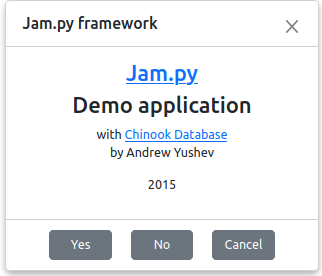
task.message(
    '<a href="http://jam-py.com/" target="_blank"><h3>Jam.py</h3></a>' +
    '<h3>Demo application</h3>' +
    ' with <a href="http://chinookdatabase.codeplex.com/" target="_blank">Chinook Database</a>' +
    '<p>by Andrew Yushev</p>' +
    '<p>2015</p>',
    {title: 'Jam.py framework', margin: 0, text_center: true, buttons: {"Yes": undefined, "No": undefined, "Cancel": undefined},
        center_buttons: true}
);
上面代码的结果如下: